Ostrich HELP!

RiceEater

New member
Ok so I put in my ostrich 2.0 tonight and now my ty runs like crap! I have some serious problems and need some help! I got the starter .bin and .xdf files from code59 and connected it to the ostrich and it said it was uploaded to emulator. I put the chip in and started the ty and it runs very rough and stumbles and if you give it any gas it dies. I have the 3 bar map installed. My only guess is I put the chip in backwards but I fliped it over and it ran the same. Can anyone please help me? Right now I have the chip in so the ribbon cable goes the same direction as all the ECM connectors. Not sure what is wrong and now datamaster cannot connect to the ECM.
 

RiceEater

New member
Re: Ostrich HELP!

Ok i see now I lack the g1 adaptor. I just plugged the chip in the same manor the old one was in. Is the adaptor needed or is it just to make it faster to plug it in?
 

WyoSyclone

Active member
Re: Ostrich HELP!

Ok i see now I lack the g1 adaptor. I just plugged the chip in the same manor the old one was in. Is the adaptor needed or is it just to make it faster to plug it in?

See if we can help here.... you don't have a G1 adapter? How did you plug the ostrich into the ECM? Maybe you had another type of chip carrier already?
 

WyoSyclone

Active member
Re: Ostrich HELP!

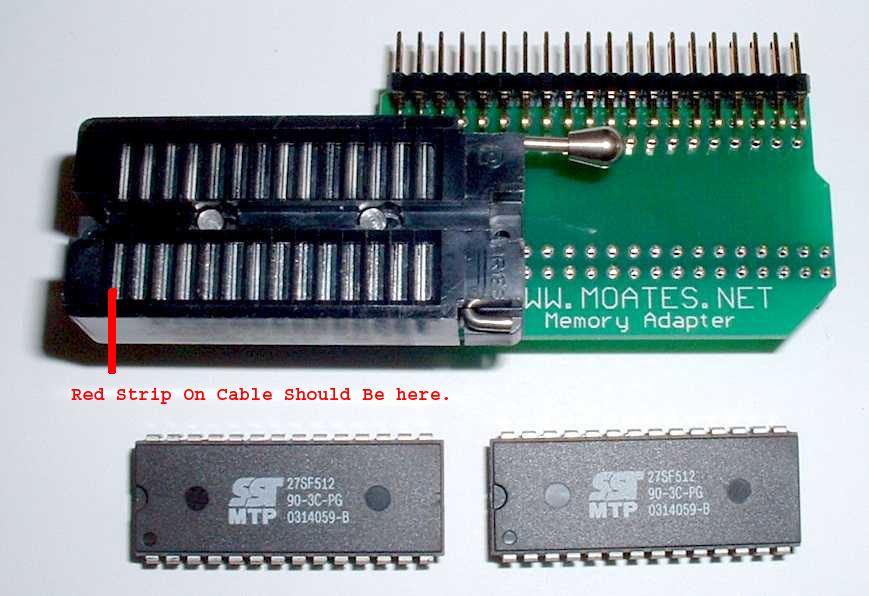
The ribbon cable should face towards the outside of the ECM... out towards the edge.

edit.... sorry, I had looked at someone else's pic.... it was backwards in that pic.... correct orientation is towards edge of case...

OstrichwithECM.jpg
 
Last edited:

RiceEater

New member
Re: Ostrich HELP!

No it was stock, I pulled the memcal out and the pins got messed up but I put them all back and used an ohm meter to make sure they all had contact. I have tryed it both ways with the same results, but it is in correctly now. Maybe I messed up a pin?
 

skwayb

NWSTP
Re: Ostrich HELP!

G1 adapter makes it easier. But you still need to the ribbon cable installed correctly. The redline on the cable is pin one. It needs to be installed so it is pointing toward the outside of the case.

GP10.jpg


Also when you upload the bin, did you try to verify it? If it fails to verify, then turn the ignition key to the on position and then upload the chip again. Then try to verify. Some Ty's you have to have the key on some you don't. Also save the chip before you upload it to make sure the CHECKSUM is correct for the chip.

Let us know what happens.
 

RiceEater

New member
Re: Ostrich HELP!

Ok I have the cable going back to the rest of the ecm and if I verify the bin it works but I was reading on code59 to disable aa oo bitcheck and then it will fail. It seems like it is getting worse now it hardly wants to start at all. Also I uploaded with the key forward and verified and it didn't help.
 

J-bird

Member
Re: Ostrich HELP!

I had similar problems this my ostrich when I first got it. I went round and round with the the thing until I tried a new set of batteries! Confirm that every thing is hooked up properly first, but don't rule out the batteries!

Later

Jeremy
 

robco

NovaSy
Re: Ostrich HELP!

I don't mean to hijack the thread but I am having the same issues. I can upload a bin and verify but it seems to run in limp mode and I cannot connect with datamaster. I have searched, read and tried any suggestions i can find.

The battery on the 2.0 seemed to be soldered on and not easily removed to try to swap it out.

I have emailed moates and am waiting for another reply from Dave. So maybe we're having some of the same issues.

~~~~~~~~~~~~~~~~~~~~~~~~~~~~~~~~~~~~~~~
> It seems the ostrich in not connecting to the ecm. The ribbon cable seems
> fine; tested each pin in the 28 pin ribbon to the socket and with the ZIF
> on it for continuity. I might have tested it through the G1 also but I
> can't remember. I can load a bin and verify just fine. I am using tunepro
> rt and I also saw some mention using the bank drop down to select a bank
> (used 0). I tried loading bin with emc conneted key on and key off, and not connected to
> ecm.
>
> Notes:
> - files used: Code59_3bar_1.5_v18_Rev4.xdf, Code59_3Bar_1.1.ads, and
> Code59_Starter_33LB_V18.BIN (also tried SBNova_Stock_V18.bin)
> - Cannot connect datamaster to aldl (xtreme usb aldl) (works fine with
> stock memcal connected)
> - tried different timings, tried latency 1 on com port
> - Cannot connect tunpro rt to aldl
> - vehicle seems to be running in limp mode
> - when I swap back to stock memcal everything works fine.(aldl and
> datamaster)
>
> I am attaching images of the hook-up.
> - ostrich switches toward usb - 28 pin mode
> - using supplied ribbon cable
> - using g1 package - tried without ZIF also.
>
> Vehicle has good voltage and grounds.

Edit - Found a pin on the G1 adapter not soldered properly - just re-soldered and everything worked
 
Last edited:

RiceEater

New member
Re: Ostrich HELP!

Ok it sounds like i'm being told 2 different things. One said to make sure the ribbon cable when in to the rest of the pcm (puts the red stripe on the inside of the zif) and the other said to make sure the red stripe was on the outside (would make to go out to the edge) does anyone have a pic one one installed? I can't see to find one with the cover off.
 

RiceEater

New member
Re: Ostrich HELP!

Thank you so much! that really helps. I take it the adaptor doesn't flip it or anything just make it connect better
 

WyoSyclone

Active member
Re: Ostrich HELP!

The G1 adapter allows the 'limp-home' chip to stay in the circuit.... you can see the edge of the memcal there plugged into the side of the G1 carrier.
 

RiceEater

New member
Re: Ostrich HELP!

Ok I found my problem I have some loose pins. I know they got messed up when I pulled the old memcal out. Can I get new pins for the sockets? If I could get some pins I could solder it in place
PHP:
 

RiceEater

New member
Re: Ostrich HELP!

OK just to update I got the g1 adaptor and it fixed all my problems. Now time to start the hard part!
 
Top